Technical article · 20 September 2026
Learning AWS by Migrating My Own Website
The renewal cost gave me the reason. Wanting to understand another cloud gave me the route.
The wake-up call
A cheap first year is not a cheap second year.
The original Hostinger promotional rate looked very attractive. The renewal did not. I noticed that rather too late to move the site safely, contacted support, and remember being offered only a fairly modest possible discount that also involved moving to a different plan. That is my recollection rather than a documented quotation, but it was not enough to change the decision in front of me.
So I paid for another year. I would love to say that I used those twelve months to prepare a careful migration. I did not. The urgency faded almost immediately and returned when the next renewal started getting close.
The web-hosting part was roughly £130 a year, with the domain roughly another £30 a year. Those are approximate figures, but removing the separate hosting renewal became the number-one motivation for the move. This was not mainly about performance, fashion or architectural elegance. It was about saving money without making the site harder for me to own.
Why AWS?
The comfortable choice was Azure.
I had no hands-on AWS experience. I understood its place in cloud infrastructure, but professionally I knew Azure. I had also experimented with Google cloud services through the Maps API while building GoDoo.
Only about a week earlier I had created an Azure subscription as a personal Microsoft test bench. Azure was therefore the obvious comfortable choice for the website too. Instead, I decided to keep the two pieces of learning in separate mental brackets: Microsoft experimentation in Azure, website hosting in AWS.
I like compartmentalising things. Separate AWS billing also gives me a much cleaner answer to the practical question behind the migration: what does this website actually cost? Choosing unfamiliar territory to broaden what I know is a recurring instinct of mine, and this was a small enough system for that instinct to be useful rather than reckless.
I did not begin with many assumptions. I expected several components and plenty of configuration. As it developed, though, the setup felt fairly intuitive: store the files privately, put a global delivery layer in front, give it a certificate, then automate the journey from source to production.
The anxiety underneath it
Pay as you go is useful. It is not the same as a spending cap.
My biggest continuing fear is not that the website will become wildly popular. It is that an account compromise or configuration mistake could create uncontrolled cloud spending. AWS is usage-based and pay-as-you-go. Budgets and notifications can warn me, but they do not act as a guaranteed hard stop.
I enabled MFA, budget alerts and Free Tier notifications, reviewed anomaly detection, kept the architecture deliberately small, and restricted permissions as tightly as I reasonably could. Those controls make me much more comfortable. What I would value even more is an enforceable account-level ceiling or a genuinely prepaid balance that cannot be exceeded.
That distinction matters. A budget is an alerting tool, not an insurance policy. The best protection available to me here is layered: strong account security, a tiny design, least-privilege access and enough monitoring to notice if reality starts departing from the plan.
The breakthrough
Static did not have to mean losing PHP.
Going fully static initially sounded like giving up PHP, which was a shock. PHP is not doing anything exotic on this site, but the templates keep pages, headers, footers and styling consistent. I did not want a cheaper hosting bill in exchange for copying navigation and footer markup into every page.
The breakthrough was separating authoring from serving. PHP remains the readable source. During the build, those templates are evaluated and turned into plain HTML. Visitors receive static files; I keep the templates.
That human-readable source matters to me. AI is a useful maintenance and authoring tool, but I still want to inspect my own repository when AI cannot solve something. I want to remain capable of writing a page manually, without prompts, and to understand what will happen when I do. Keeping control and comprehension lets my own knowledge grow. It also makes the repository easier for both humans and AI to work with.
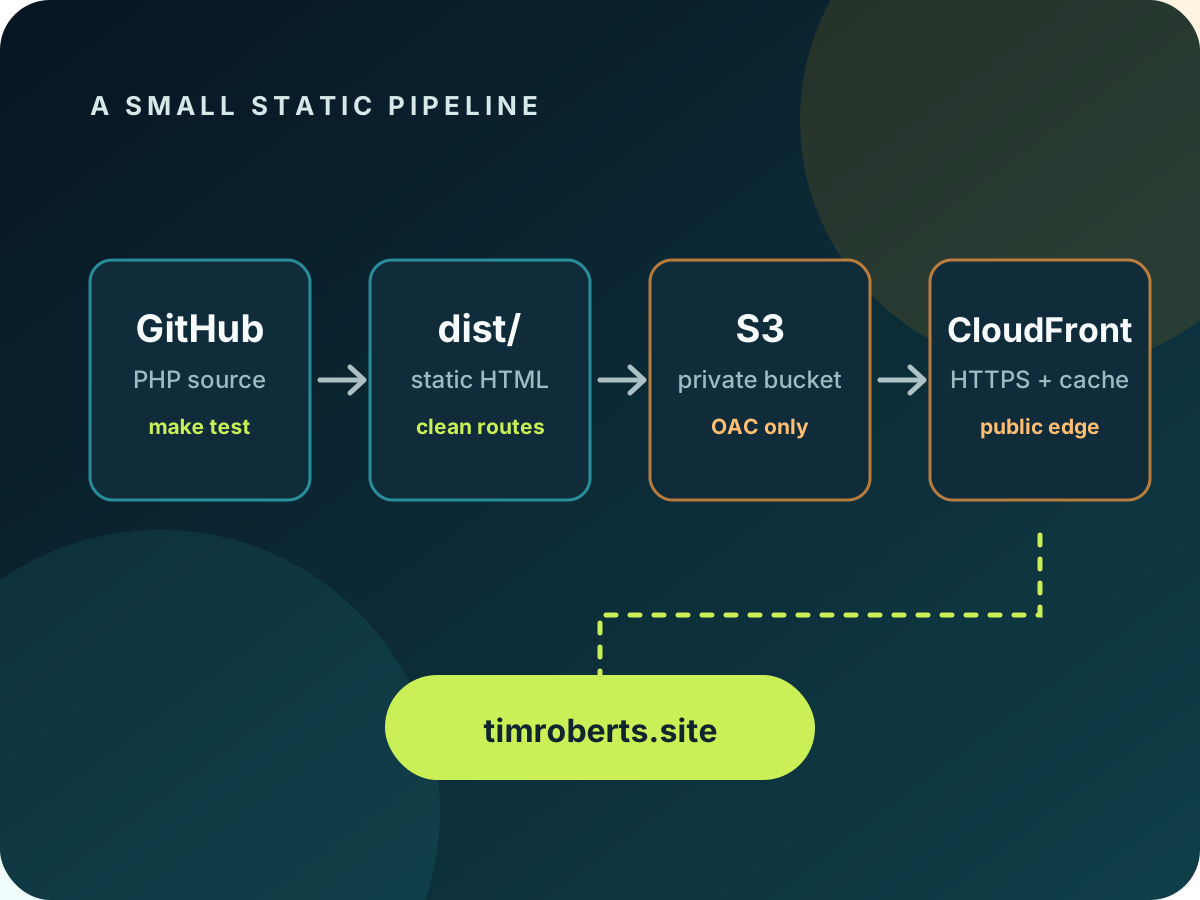
The local make test process evaluates the PHP templates, creates directory-style index.html routes, copies assets, and excludes source and hosting-only files. It also checks for PHP left in the output, missing pages, incomplete documents and broken local links or assets. Any failure stops the deployment. At the time of migration it produced around twenty routes, twenty-two HTML documents and more than seventy files, but those are observations, not permanent limits.
The architecture
Small enough to explain in one line.
Source to visitor
GitHub repository → PHP static build → dist/ → private S3 bucket in London → CloudFront → timroberts.site.
The S3 bucket has Block Public Access enabled, ACLs disabled and no website endpoint. Objects use SSE-S3 encryption. CloudFront reaches the bucket through Origin Access Control; the bucket is not opened to the internet.
CloudFront supplies HTTPS, caching, compression, the root and www aliases, HTTP-to-HTTPS redirection and the default root document. The certificate came from AWS Certificate Manager. Because CloudFront requires its ACM certificate in us-east-1, that certificate lives in North Virginia even though the S3 bucket is in eu-west-2. Validation happened through DNS records at Hostinger.
Friendly routes
Clean URLs and errors are different problems.
Static object storage naturally thinks in filenames. The site thinks in routes such as /studio/. A small CloudFront Function, written in JavaScript and run on viewer requests, rewrites friendly directory-style URLs to the correct index.html objects. That solves navigation without exposing filenames.
Missing pages needed separate handling. With this private S3 origin and no bucket-list permission, a request for a missing object can return 403 AccessDenied rather than 404 Not Found. That does not mean every 403 is secretly a missing object. It means CloudFront needs an intentional response for the relevant origin errors.
My first configuration was wrong: the 403 response pointed to a nonexistent /403.html and still returned public status 403. Testing a deliberately impossible URL exposed it. I corrected the custom responses so the relevant origin 403 and 404 errors serve /404.html while returning public status 404. The route rewrite and the error mapping work together, but they are not the same feature.
Deployment without stored keys
GitHub gets temporary credentials.
A push to the main branch starts GitHub Actions. The workflow runs make test, obtains temporary AWS credentials through OpenID Connect, synchronises dist/ to S3 while deleting obsolete deployed files, then creates a CloudFront invalidation.
There is no permanent AWS access key stored in GitHub. The OIDC trust is restricted to the canonical repository and main branch, and the AWS role is limited to the bucket and CloudFront actions required by this deployment. That is both safer and easier to reason about than a long-lived credential quietly waiting in repository settings.
19 September 2026
The DNS cutover was a little underwhelming, but nice.
The live change was deliberately small. I changed only the root ALIAS and the www CNAME. Mail-related records and the certificate validation records stayed where they were.
Email continuity mattered because mail@timroberts.site is an established correspondence address. Hostinger remains the registrar and email provider; only the website hosting moved.
After all the preparation, the DNS cutover was smooth—a little underwhelming, but nice. The old Hostinger web-hosting plan still has roughly one or two months left and is set not to renew. That overlap is intentional: if something serious appears during the observation window, I can point the website records back while investigating.
The outcome
The saving is estimated. The learning is already real.
Before the move, I estimated an annual saving of roughly £90 to £110. That is not a promise. The AWS billing dashboard initially showed no charge, but the migration was extremely recent and AWS billing can lag. I do not yet know the first settled monthly cost.
This was not the absolute cheapest possible solution. GitHub Pages could probably have hosted the static result with custom DNS and no separate hosting charge. AWS was a deliberate learning investment. I would recommend this route primarily to somebody who wants to learn AWS, not to somebody whose only requirement is the cheapest possible static website.
The satisfying result is simpler than the architecture diagram: the separate web-hosting renewal is gone. Hostinger remains for the domain and email, while AWS serves the site through infrastructure I now understand much better than I did a few days ago.
What next?
Translate the shape, then try something less static.
I want to map this architecture to its equivalents in Azure and Google Cloud: object storage, edge delivery, certificates, identity and deployment automation. Comparing the same small system across providers should make the differences much easier to understand.
I also have web apps currently hosted with Fly.io. I am not moving them merely for the sake of it, but I now have a better basis for asking whether some of them could eventually run sensibly on AWS.
The migration began as a renewal problem. It ended as exactly the kind of bounded technical project I enjoy: practical enough to matter, unfamiliar enough to teach me something, and still small enough that I can explain every important part.